

Finding the right AI image generator tools is not as straightforward as it used to be. Every few weeks, there’s a new platform claiming to create more realistic images, better artwork, or faster results than the rest.
After exploring dozens of these tools, I have learned that each one has its own strengths and quirks. Some are brilliant for artistic visuals, others handle photorealistic images better, while a few are simply easier to learn.
In this blog, I will compare the 10 best AI image generators and help you choose the one that fits your workflow.
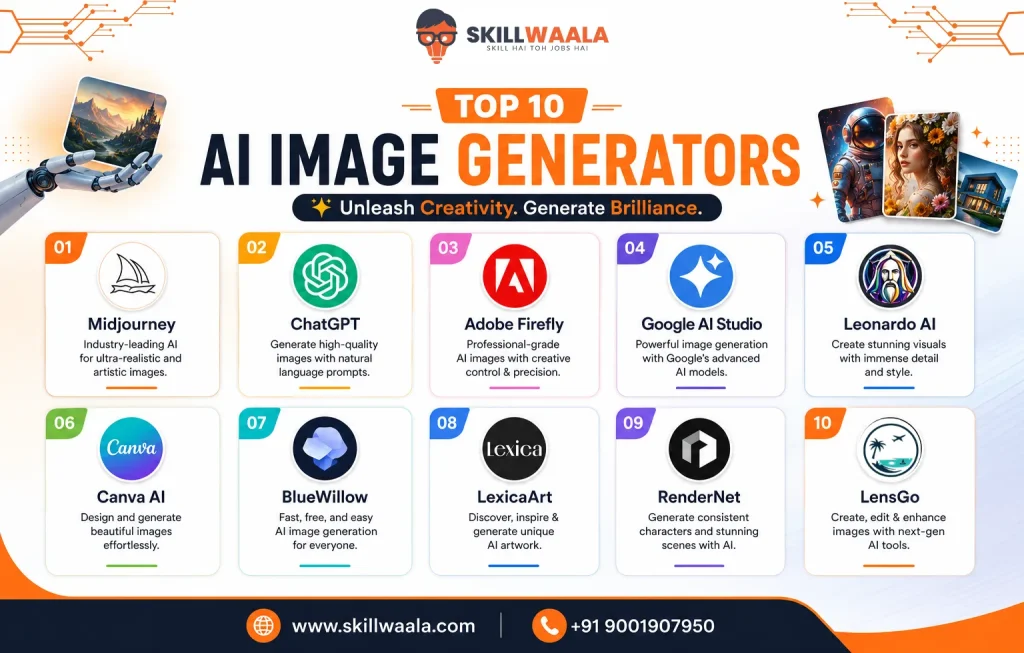
Quick Comparison of the 10 Best AI Image Generator Tools
If you only need a quick recommendation, this table should save you a lot of trial and error. None of these tools is perfect, and that’s exactly why many creators switch between them depending on the project. I still find myself using different tools throughout the week because one platform rarely gets everything right.
| AI Image Generator Tool | Best For | Free Plan | Ease of Use | Starting Price |
|---|---|---|---|---|
| Midjourney | Artistic illustrations, concept art, stylized visuals | No | Moderate | Paid plans only |
| ChatGPT (GPT Image) | Everyday image generation, editing, brainstorming | Yes (Limited) | Very Easy | ChatGPT Plus for advanced features |
| Adobe Firefly | Commercial-safe designs and marketing creatives | Yes (Limited credits) | Easy | Paid Creative Cloud plans |
| Google AI Studio | Fast image generation and AI experimentation | Yes | Moderate | Free with usage limits |
| Leonardo AI | Game assets, character design, concept art | Yes | Moderate | Paid plans available |
| Canva AI | Social media posts, presentations, marketing graphics | Yes | Very Easy | Canva Pro for premium features |
| BlueWillow | Beginners exploring AI art | Yes | Easy | Premium plans available |
| Lexica Art | Prompt inspiration and realistic AI artwork | No | Easy | Paid plans only |
| RenderNet | Photorealistic characters and AI influencers | No | Moderate | Paid plans only |
| LensGo | AI images with image-to-video capabilities | Yes | Easy | Paid plans available |
Not every tool earned its spot for the same reason. Midjourney still produces some of the most impressive artistic images I have seen, but I would not recommend it to someone creating their first AI image.
On the other hand, Canva AI is beginner-friendly, but it gives you fewer creative controls.
A few tools also surprised me. Google AI Studio is not usually the first name people mention in AI image generation, yet its image capabilities have improved quite a lot.
On the other hand, some platforms make bold claims about realism, but you will probably notice their limitations once you start generating faces or text-heavy visuals.
1. Midjourney: Best for Artistic Illustrations & Concept Art
Midjourney still produces some of the most visually striking AI artwork I have seen. It understands artistic styles remarkably well, making it a favorite among designers and digital artists. However, I expected its text generation to be better. And beginners may find the interface less intuitive than other tools.
Key Features
- High-quality artistic image generation
- Style reference and character reference
- Advanced image editing
Pros
- Outstanding image quality
- Consistent artistic styles
Cons
- No free plan
- Weak text rendering
Pricing: Starts at $10/month
2. ChatGPT: Best for Everyday AI Image Generation
ChatGPT surprised me with how quickly it has become an all-around image generator. Creating, editing, and refining images through conversation feels natural, especially if you are already using ChatGPT. The marketing sounds impressive, but in day-to-day use, complex typography and highly detailed scenes can still need a few retries.
Key Features
- Image generation from text prompts
- Conversational image editing
- Multiple arty styles
Pros
- Extremely easy to use
- Great prompt understanding
Cons
- Limited free image generation
- Fine details may require multiple attempts
Pricing: Free plan available; Plus starts at $20/month
3. Adobe Firefly: Best for Commercial & Marketing Creatives
Adobe Firefly is one of the few tools I’d confidently recommend for commercial projects. Its biggest advantage is content that’s designed to be commercially safer than many competitors. What surprised me is how seamlessly it fits into Photoshop and Illustrator, although I expected more creative freedom compared to Midjourney.
Key Features
- Commercial-safe AI image generation
- Generative fill and generative expand
- Adobe Creative Cloud integration
Pros
- Excellent for professional workflows
- Easy to edit generated images
Cons
- Creative styles feel somewhat limited
- Credit-based free plan
Pricing: Free plan available; Premium starts at $9.99/month
Looking for the best AI tools to create Instagram Reels, YouTube Shorts, or TikTok videos? Explore our handpicked list of the Top 10 AI Reel Maker Tools to generate scripts, edit videos, add captions, and produce engaging short-form content in minutes.
Explore the Top 10 AI Reel Maker Tools →4. Google AI Studio: Best for AI Experimentation & Fast Image Generation
Google AI Studio has improved faster than I expected. It generates quality images quickly and gives you access to Google’s latest AI models without much setup. The marketing sounds impressive, but in day-to-day use, it feels more like an experimentation platform than a dedicated design tool.
Key Features
- Fast AI image generation
- Access to Google’s latest AI models
- Prompt testing and experimentation
Pros
- Free to explore
- Quick, high-quality outputs
Cons
- Limited editing capabilities
- Interface isn’t beginner-focused
Pricing: Free (usage limits apply)
5. Leonardo AI: Best for Game Assets & Character Design
Leonardo AI has earned a loyal following among game developers and digital artists. Its preset models and customization options make character creation surprisingly flexible. What surprised me is how consistent the outputs remain across multiple generations. For beginners, I wouldn’t start here because the number of settings can feel overwhelming.

Key Features
- AI models for game assets
- Character consistency
- Canvas editor and image upscaling
Pros
- Highly customizable
- Excellent for concept art
Cons
- Learning curve
- Free credits run out quickly
Pricing: Free plan available; Paid plans start at $10/month
Midjourney or Leonardo AI – Which One Should You Choose?
Both tools can create impressive AI-generated images, but they have different strengths. Check our detailed comparison to see which one fits your creative needs, workflow, and budget.
Compare Midjourney & Leonardo AI →6. Canva AI: Best for Social Media & Presentation
Canva AI isn’t trying to compete with Midjourney on artistic quality, and that’s perfectly fine. It’s built for speed, not perfection. If you’re creating presentations, social posts, or marketing creatives, it gets the job done with minimal effort. I expected more editing controls, but the seamless Canva workflow easily makes up for that limitation.
Key Features
- Text-to-image generator
- Magic Media tools
- Built-in design templates
Pros
- Extremely beginner-friendly
- Integrated editing workflow
Cons
- Limited creative control
- Less detailed artwork
Pricing: Free plan available; Canva Pro starts at ₹500/month (approx.)
7. BlueWillow: Best for Beginners Exploring AI Art
BlueWillow is a good starting point if you’re new to AI image generation and don’t want to pay upfront. The prompts are easy to work with, and the results are decent for everyday projects. You’ll probably hit its limitations sooner than you think, especially if you’re aiming for highly detailed or photorealistic images.

Key Features
- Text-to-image generation
- Multiple art styles
- Beginner-friendly interface
Pros
- Free to get started
- Simple learning curve
Cons
- Inconsistent image quality
- Fewer advanced controls
Pricing: Free plan available; Premium plans available
Want to create better YouTube videos in less time? Discover the Top 5 AI Tools for YouTubers that help with script writing, video editing, thumbnail creation, SEO optimization, and content planning – so you can focus on growing your channel faster.
Explore the Top 5 AI Tools for YouTubers →8. Lexica Art: Best for Prompt Inspiration & AI Art
Lexica Art is more than just an image generator. It’s often one of the best places to learn prompt writing. Browsing thousands of public prompts often teaches you more than starting from scratch.
What surprised me is how useful this becomes once you begin experimenting with different styles. Although I expected stronger editing features.

Key Features
- AI image generation
- Searchable prompt library
- Realistic and artistic outputs
Pros
- Great for prompt inspiration
- Easy to use
Cons
- Limited editing tools
- Fewer customization options
Pricing: Starts at $10/month
Canva vs Adobe Express: Which Is Better for AI & Design?
From Canva’s Magic Studio to Adobe Express and Firefly, both platforms offer powerful AI features. See how they compare for AI image generation, creative editing, templates, typography, file compatibility, and overall creative control.
See Which One Wins →9. RenderNet: Best for Realistic AI Characters
If realistic portraits or AI influencers are your goal, RenderNet deserves a closer look. It produces convincing facial details and maintains character consistency better than many general-purpose tools. The marketing sounds impressive, and for realistic characters, it largely delivers. Outside that niche, however, I expected more versatility.
Key Features
- Photorealistic AI characters
- Character consistency
- Portrait generation tools
Pros
- Excellent facial realism
- Ideal for creator workflows
Cons
- Limited creative styles
- Best suited for character-focused projects
Pricing: Starts at $24/month
10. LensGo: Best for AI Images & Image-to-Video Generation
LensGo stands out by combining AI image generation with image-to-video capabilities in one platform. That makes it a practical choice if you’re creating short-form content or experimenting with AI videos.
One thing that stood out was how easy it is to animate static images. I expected the image quality to be more consistent, though, and you’ll probably notice occasional variations in complex scenes.
Key Features
- Text-to-image generation
- Image-to-video conversion
- AI style transfer
Pros
- Supports both images and videos
- Beginner-friendly interface
Cons
- Image quality can vary
- Limited advanced editing features
Pricing: Free plan available; Paid plans available
Discover a step-by-step roadmap to learn the most useful AI tools in just 30 days. Whether you’re a student, marketer, creator, or business owner, this guide helps you build practical AI skills with daily learning tasks and recommended tools.
Read: Master AI Tools in 30 Days →Which AI Tool Has the Best Image Generator?
The answer depends on what you’re trying to create. After comparing these tools side by side, a few clear winners emerge.
| Use Case | Recommended Tool | Why It Stands Out |
|---|---|---|
| Best Overall | Midjourney | Exceptional image quality and artistic styles. |
| Best for Realistic Photos | RenderNet | Creates consistent, lifelike portraits and AI-generated characters. |
| Best Free AI Image Generator | Google AI Studio | Provides powerful free access with impressive image quality. |
| Best for Beginners | Canva AI | Offers a simple interface with a minimal learning curve. |
| Best for Marketing Creatives | Adobe Firefly | Generates commercial-friendly images with seamless Adobe integration. |
| Best for Character Design | Leonardo AI | Delivers advanced customization and consistent character styles. |
| Best for Prompt Learning | Lexica Art | Includes a massive prompt library for inspiration and experimentation. |
One thing became obvious while testing these tools: there isn’t a universal winner. Midjourney still creates some of the best artwork, but I wouldn’t recommend it to everyone.
Canva AI is much easier to learn, even if it sacrifices creative control.
Google AI Studio surprised me with how quickly it has improved.
RenderNet performs best when realistic characters are the priority.
Whether you’re creating YouTube videos, marketing campaigns, social media content, product demos, or cinematic short films, choosing the right AI video tool can save hours of work. Explore our comparison of the 15 Best Text-to-Video AI Generators to discover the ideal platform based on video quality, AI features, pricing, and ease of use.
Compare the Top 15 AI Video Generators →Best AI Image Generator for Realistic Photos
Some generate lifelike portraits with accurate lighting and skin texture, while others still struggle with small details like hands, eyes, or readable text. If realism is your priority, these are the tools I’d recommend.
| Tool | Why It Works Well | Best For |
|---|---|---|
| RenderNet | Excellent facial realism and consistent character generation. | AI influencers, portraits, and virtual models. |
| Midjourney | Produces cinematic lighting and highly detailed compositions. | Editorial, creative, and artistic photography. |
| ChatGPT (GPT Image) | Understands prompts well and creates natural-looking edits. | Everyday realistic image generation and editing. |
| Google AI Studio | Generates realistic images quickly with minimal prompting. | Product visuals, prototypes, and AI experiments. |
| Adobe Firefly | Creates clean, commercial-friendly images suitable for business use. | Marketing campaigns, branding, and promotional creatives. |
RenderNet surprised me the most. It does not receive as much attention as Midjourney or ChatGPT, yet it consistently delivers realistic faces.
Midjourney still produces stunning photorealistic scenes, but I expected it to handle text and tiny facial details more consistently.
For beginners, a well-written prompt often has a bigger impact than switching between image generators. Once you understand lighting, camera angles, and descriptive prompts, most modern AI image generator tools produce noticeably better results.
Whether you’re creating YouTube animations, social media reels, AI avatars, explainer videos, or cinematic content, the right AI animation tool can dramatically speed up your workflow. Explore our comparison of the Top AI Animation Generators to compare features, pricing, free plans, and real-world use cases before choosing the best one for your next project.
Compare the Top AI Animation Generators →Which AI is Best for Image Generation for Free?
The good news is that you don’t need a paid subscription to start creating AI images. Most tools now offer a free plan, although the experience varies quite a bit.
| Tool | Why It Works Well | Best For |
|---|---|---|
| RenderNet | Excellent facial realism and consistent character generation. | AI influencers, portraits, and virtual models. |
| Midjourney | Produces cinematic lighting and highly detailed compositions. | Editorial, creative, and artistic photography. |
| ChatGPT (GPT Image) | Understands prompts well and creates natural-looking edits. | Everyday realistic image generation and editing. |
| Google AI Studio | Generates realistic images quickly with minimal prompting. | Product visuals, prototypes, and AI experiments. |
| Adobe Firefly | Creates clean, commercial-friendly images suitable for business use. | Marketing campaigns, branding, and promotional creatives. |
Google AI Studio surprised me the most. I expected it to be more developer-focused, yet it’s one of the strongest free options for generating quality images.
BlueWillow is another good place to begin, but you will probably hit its limitations sooner than you think if you’re aiming for professional-quality visuals.
Leonardo AI offers generous free credits, although they can disappear quickly once you start experimenting.
How to Generate AI Images?
Learning how to generate AI images is easier than most people expect. The challenge is learning how to describe what you actually want. The same tool can produce an average image or an exceptional one, depending on the prompt.
Step 1: Choose the Right AI Tool
Pick a tool based on your goal. Midjourney works well for artistic visuals, Canva AI is great for quick designs, and RenderNet is a solid choice for realistic portraits. For beginners, I wouldn’t overthink this step. Start with one tool and learn its strengths before jumping to another.
Step 2: Write a Detailed Prompt
Instead of writing “create an image of a cat,” describe the entire scene.
Example: A fluffy white cat sitting on a wooden windowsill during golden hour, soft sunlight, realistic photography, shallow depth of field.
This surprised me when I first started experimenting. Adding just a few details about lighting, style, or camera angle often improves the output more than switching to a different AI model.
Step 3: Generate Multiple Variations
Don’t settle for the first image. Most tools create several versions, and one usually stands out. You will probably hit better results by refining the prompt than starting over completely.
Step 4: Refine and Edit
Adjust your prompt, regenerate the image, or use built-in editing tools to fix areas like backgrounds, lighting, or unwanted objects. The marketing sounds impressive, but in day-to-day use, almost every AI image benefits from at least one round of refinement.
Step 5: Download and Use Responsibly
Before using an image for commercial work, check the platform’s licensing terms. Most leading AI image generators allow commercial use under certain conditions, but the rules vary from one tool to another.
Curious how AI can reshape images by simply dragging points? Explore our complete DragGAN AI Editing Tool guide to learn how this innovative technology works, its key features, real-world applications, limitations, and why it’s changing the future of AI-powered image editing. Whether you’re a designer, creator, or AI enthusiast, this guide will help you understand what makes DragGAN unique.
Explore the Complete DragGAN AI Guide →Prompt Tips for AI Image Generators
If there’s one skill worth learning, it’s prompts for AI image generators. The best AI image generator tools can only work with the information you provide. I have seen average tools produce excellent images with a well-written prompt, while premium platforms struggled because the prompt was too vague.
Prompt Formula:
Subject + Environment + Style + Lighting + Camera Angle + Quality + Mood
Example:
“A golden retriever running through a sunflower field during sunset, photorealistic, warm golden-hour lighting, low-angle DSLR shot, ultra-detailed, vibrant colors, joyful atmosphere, 4K.”
Here are a few practices that consistently improve results:
A Simple Prompt Template
If you’re unsure where to begin, use this prompt template and customize it to your needs.
Create a photorealistic image of a young entrepreneur working on a laptop in a modern co-working space. Natural morning sunlight enters through large glass windows, indoor plants in the background, shallow depth of field, DSLR photography, ultra-detailed, vibrant colors, 4K resolution, professional composition.
Be Specific
Small details make a bigger difference than most people expect.
Instead of writing:
“A mountain”
Use: “A snow-covered Himalayan mountain at sunrise, cinematic lighting, ultra-realistic, 8K, drone perspective.
Describe the Style
This technique surprised me because simply adding a style often changes the entire mood of the image. Mention the visual style you want, such as:
- Photorealistic
- Watercolor painting
- Anime
- Oil painting
- 3D render
- Pixel art
- Minimalist illustration
Add Camera and Lighting Details
Details usually produce more natural-looking outputs. If you’re generating realistic images, include terms like:
- Golden hour
- Soft lighting
- Studio lighting
- Wide-angle lens
- Close-up portrait
- Shallow depth of field
Keep Refining Your Prompt
Don’t expect the perfect image on the first attempt. I expected AI models to understand simple prompts better, but in day-to-day use, refining the wording is still part of the process. Even changing one adjective can produce a noticeably different result.
Are AI-Generated Images Safe to Use?
Yes, AI-generated images are generally safe to use. For everyday projects like presentations, blog posts, marketing creatives, and social media, AI-generated images are perfectly safe to use as long as you follow the platform’s licensing terms and review the final output before publishing.
Check the Commercial License
If you’re creating images for a website, YouTube channel, or business, review the platform’s commercial usage policy first. Adobe Firefly, for example, was built with commercial use in mind, while other tools have different licensing terms depending on your subscription.
Avoid Copyright Confusion
AI tools are much better than they were a few years ago, but I still avoid prompts that reference copyrighted characters, brand logos, or living artists.
Don’t Share Sensitive Information
Never include personal, financial, or confidential information in your prompts. Most AI platforms process prompts on their servers, so it’s better to treat them as public rather than private.
Review Every Generated Image
Small mistakes are easier to miss than obvious ones. I learned this the hard way when I was regularly using image generator tools. Look closely at faces, hands, product labels, and background details before downloading or publishing the image.
Follow the Platform’s Guidelines
Each AI image-generating tool has its own policies on commercial use and ownership. You will probably run into restrictions sooner than you think if you’re creating sensitive, medical, political, or copyrighted content.
Final Words: Which AI Image Generator Should You Choose?
After comparing all these tools, it’s clear that there is not a single tool that is perfect for every project. The best choice depends on what you’re trying to create and how much control you want over the final result. If I were recommending just a few tools, here’s where I’d start:
- Choose Midjourney if artistic quality is your top priority
- Choose ChatGPT if you want a simple, conversational way to create and edit images
- Choose Adobe Firefly for commercial designs and marketing assets
- Choose Canva AI if you’re looking for speed and ease of use
- Choose Google AI Studio if you want to experiment without spending money
- Choose RenderNet for realistic portraits and AI characters
While comparing these tools, I was surprised to see how quickly the landscape is changing. A platform that feels average today could become one of the best after a few major updates. That’s why I wouldn’t get too attached to a single tool.
Frequently Asked Questions (FAQs)
There’s no universal winner, but Midjourney consistently delivers the best artistic images and concept art. However, for everyday use, ChatGPT offers one of the simplest image generation experiences.
Google AI Studio stands out because it offers impressive image quality without an upfront cost. Canva AI, BlueWillow, and Leonardo AI are also worth trying, but they offer limited credits.
Yes, but always check the platform’s licensing policy first. Adobe Firefly is designed with commercial use in mind, while others have different terms depending on your subscription.
The biggest improvement usually comes from writing better prompts instead of switching tools. Always include details about the subject, style, lighting, camera angle, and mood.
If you’re just starting out, Canva AI and ChatGPT are the easiest to learn. Their interfaces are straightforward, and you can create quality images without spending hours understanding advanced settings.
Not necessarily. Most modern tools understand natural language quite well. That being said, learning basic prompt writing will noticeably improve your results. Even the best AI models still rely on clear instructions to produce consistently high-quality images.
About The Author

