
AI is changing the way people work, learn, and solve problems. From writing content and analyzing data to creating presentations and automating repetitive tasks, Generative AI has become a practical skill rather than a futuristic concept. That’s why learning to master AI tools is quickly becoming a valuable career advantage.
The good news is that you don’t need months of technical training to get started. With the right roadmap and consistent practice, 30 days is enough to build practical AI skills. If you are looking for the best way to learn AI, this guide will give you a structured 30-day roadmap to help you master AI tools and use them effectively.
Can You Really Master AI Tools in 30 Days?
The short answer is yes. But only if your definition of mastery is realistic.
Many people imagine mastering AI means building machine learning models, writing complex Python code, or understanding neural networks inside out. That’s a different journey altogether.
For most learners, mastering AI tools means becoming confident enough to use them to solve real-world problems consistently.
Thirty days is enough to reach that level. Here’s what you can realistically achieve in a month with focused learning:
- Write high-quality prompts that produce better outputs
- Use AI for writing, research, presentations, coding, and image generation
- Automate repetitive tasks to save hours every week
- Compare different AI tools and choose the right one for each task
- Build a portfolio of AI-assisted projects that demonstrate practical skills
How Long Does It Take to Master AI Tools?
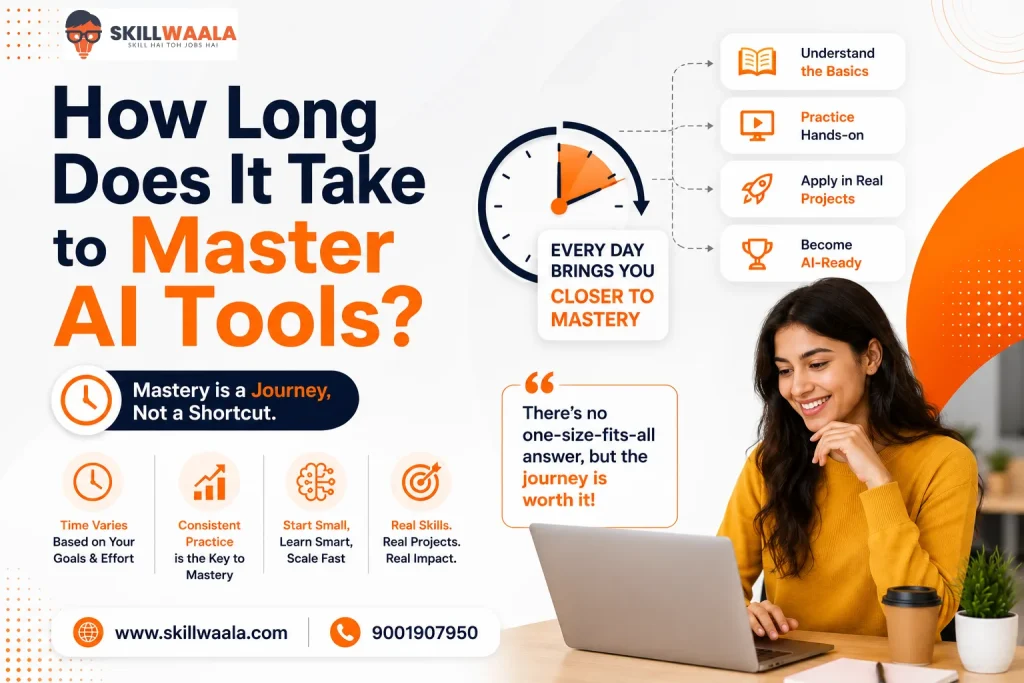
It depends on what you want to achieve. If your goal is to become comfortable using popular AI platforms for work, studies, or freelance projects, 30 days of daily practice is often enough to build strong confidence. Spending just 45 to 60 minutes each day can produce noticeable improvements because AI rewards experimentation more than passive learning.
However, if you want to become an AI engineer or a machine learning specialist, you should expect several months or even years of studying programming, data structures, and model development.
I’m not gonna lie to you and say that you can achieve this goal in just 30 days.
Many learners quit because they compare themselves with AI researchers instead of practical AI users. That’s like comparing someone learning to drive with a Formula 1 racer. Both operate cars, but the skill sets are worlds apart.
What Does Mastering AI Tools Actually Mean?
Mastering AI is not about knowing every tool on the internet. New platforms appear almost every week, making that approach impossible to sustain.
A smarter strategy is learning transferable skills. Focus on writing effective prompts, evaluating AI responses, combining multiple tools into a workflow, and understanding each platform’s strengths and limitations.
Once these fundamentals become second nature, picking up a new AI tool usually takes hours, instead of days.
Here’s my observation – People who rely on one ‘magic prompt’ often plateau quickly. Those who keep refining prompts, testing different approaches, and questioning AI-generated answers improve much faster.
What You Don’t Need to Learn Before Using AI Tools?
One of the biggest misconceptions about AI is that you need a technical background before you can use it effectively. That simply is not true for most modern AI tools. You don’t need to learn:
- Python programming
- Machine learning algorithms
- Data science
- Neural networks
- Advanced mathematics
Instead, focus on skills that deliver immediate value:
- Writing clear and specific prompts
- Evaluating AI-generated responses
- Fact-checking important information
- Building simple AI workflows
- Choosing the right AI tool for different tasks
Think of AI tools like Microsoft Excel. Millions of people use Excel every day without understanding how every formula or function works behind the scenes.
AI works similarly. You can become highly productive by learning how to use the tool effectively, even if you don’t know how the underlying model was built.
As your confidence grows, you can always explore advanced topics later. There’s no need to master the technology before benefiting from it.
A Practical 30-Day Roadmap to Master AI Tools
A structured plan beats binge-learning every single time. Instead of chasing every new app that trends on social media, spend a month building skills layer by layer. By the end of these 30 days, you will know how to use AI properly.
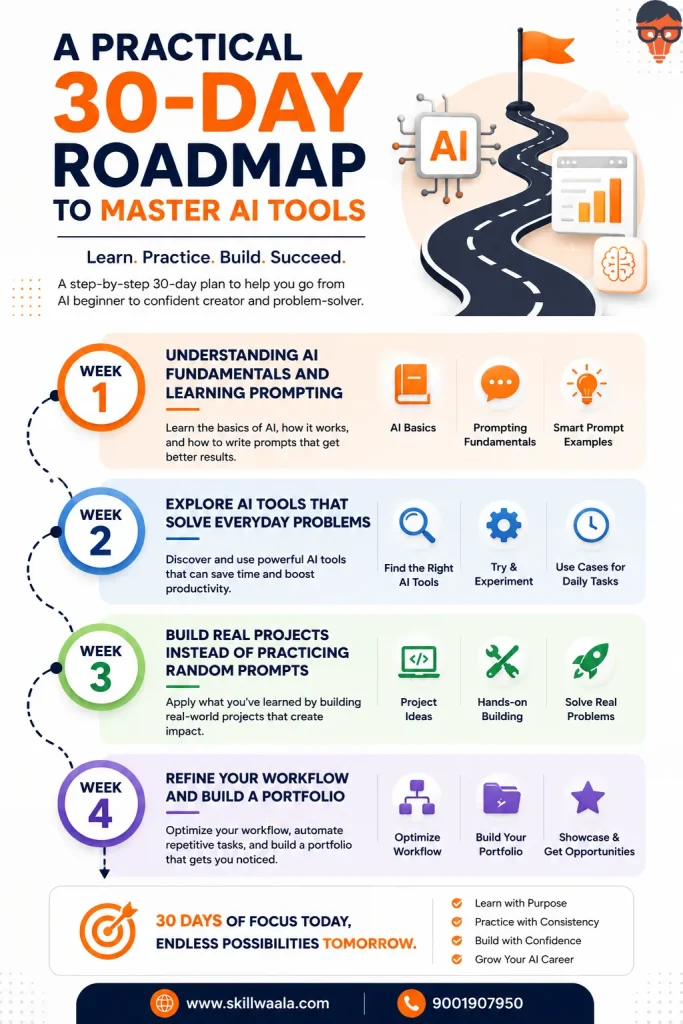
Week 1: Understanding AI Fundamentals and Learning Prompting
Before you expand your portfolio with dozens of tools, take some time to understand how AI actually works. You don’t need to study machine learning algorithms. Learn what generative AI is, why hallucinations happen, and how different models respond to prompts.
In the first week, your biggest priority should be prompt engineering. Practice writing prompts with clear goals, context, constraints, and expected output formats. Ask the same question in different ways and compare the responses.
Along with prompt writing, spend some time understanding AI’s limitations. Generative AI can occasionally produce inaccurate information, commonly known as AI hallucinations. It is important to fact-check important facts and refine prompts based on previous responses.
You will quickly notice that better prompts produce significantly better results.
Here’s how to practice daily:
- Summarize news articles in different tones
- Rewrite emails professionally and casually
- Brainstorm business ideas or content topics
- Convert lengthy notes into concise bullet points
Week 2: Explore AI Tools That Solve Everyday Problems
Now it’s time to move beyond chatbots. Choose a handful of AI tools across different categories rather than downloading everything you see online.
A writing assistant, an image generator, a presentation tool, a research assistant, and a meeting summarizer are enough to understand how AI fits into daily work. Pay attention to each tool’s strengths and weaknesses.
For example, one tool may excel at research but struggle with creative writing, while another generates stunning visuals but offers limited editing controls. Learning these differences saves far more time than forcing one platform to do everything.
At the end of the day, the tools you use will depend on your use case. A Data Analyst will use a completely different set of tools from a graphic designer.
Week 3: Build Real Projects Instead of Practicing Random Prompts
Knowledge sticks when it’s attached to something meaningful. Rather than generating isolated outputs, create complete projects that mimic real work. This helps you combine multiple AI tools into a workflow instead of treating each one as a separate experiment.
The fastest way to learn AI is by applying it to work you actually enjoy. Rather than completing random exercises, create projects that match the career you want to pursue.
| Career Goal | AI Project Ideas |
|---|---|
| Content Writing | Write a long-form blog, create a social media campaign, and develop an email sequence. |
| Digital Marketing | Create an SEO content strategy, keyword plan, and Google Ads copy. |
| Graphic Design | Design social media creatives, marketing banners, and brand mockups using AI. |
| Web Development | Build a responsive landing page with AI coding assistants and UI suggestions. |
| Business & Sales | Prepare a sales pitch, customer personas, and a professional presentation deck. |
| HR & Recruitment | Generate interview questions, job descriptions, onboarding documents, and hiring workflows. |
Week 4: Refine Your Workflow and Build a Portfolio
The final week is about turning scattered skills into repeatable habits. Review every project you have completed. Improve prompts, edit AI-generated content manually, and identify tasks where AI genuinely saves time.
You will probably notice that your first prompts now look surprisingly weak, and that’s a good sign. It means that you are improving.
Document your best work and create a small portfolio featuring AI-assisted writing samples, presentations, websites, and design concepts. Employers and clients are often more interested in seeing what you can produce than hearing which course you completed.
By Day 30, expect the confidence to learn any new tool quickly because you have mastered the fundamentals that rarely change.
Which AI Tools Should You Learn First?
New AI tools launch almost every week. Trying to keep up with all of them is exhausting and, honestly, unnecessary. Learn one reliable tool from each category. Once you understand the workflow, switching platforms becomes much easier because the underlying concepts stay surprisingly similar. Here’s a practical starting point:
| Use Case | Recommended AI Tools | Best For |
|---|---|---|
| Writing & Brainstorming | ChatGPT, Claude, Gemini | Content creation, emails, research |
| Image Generation | Midjourney, Adobe Firefly, Canva AI | Social media graphics, illustrations, marketing creatives |
| Presentations | Gamma, Beautiful.ai | Slides, reports, business pitches |
| Coding | GitHub Copilot, Cursor | Code suggestions, debugging, learning programming |
| Research | Perplexity AI | Finding sources, summarizing information |
| Video Creation | Runway, Pika | Short videos, AI-generated visuals |
| Automation | Zapier AI, Make | Connecting apps and automating repetitive tasks |
A common beginner mistake is expecting one AI to handle every task perfectly.
For example, you might use one tool to research a topic, another to draft content, a third tool to create visuals, and a fourth tool to design a presentation.
Each platform has its strengths, so using them together usually delivers better results than relying on a single AI assistant. A simple workflow could look like this:
Research > Writing > Design > Review > Publish
Can You Learn AI by Yourself?
Absolutely. In fact, many people using AI confidently today are self-taught. Unlike traditional technical fields that often require expensive software or advanced hardware, most AI tools are accessible through a web browser. If you have an internet connection, curiosity, and willingness to experiment, you are already equipped to begin.
Can I Learn AI by Myself?
Yes, but there’s a catch.
Self-learning works only when you follow a structured plan. Watching random tutorials whenever they appear in your feed may feel productive, yet it often leads to scattered knowledge. You know a little about everything but struggle to apply any of it.
Instead, use this simple learning cycle:
- Learn one concept
- Try it on a real task
- Make mistakes
- Improve your prompt or workflow
- Repeat
Can a Non-IT Person Learn AI?
Yes, without question. You don’t need a computer science degree to use AI effectively. Marketing professionals use it to create campaigns. HR teams draft job descriptions and screen resumes. Teachers prepare quizzes and lesson plans.
Finance professionals summarize reports, while entrepreneurs rely on AI for customer support, presentations, and business planning. The common factor is not coding. It’s problem-solving.
If you can explain a task clearly, you’re already developing one of the most valuable AI skills: communicating with the model through effective prompts.
Where Self-Learning Goes Wrong?
I have seen a pattern repeat quite often. Beginners spend hours searching for the perfect AI tool, but barely spend any time practicing with the tools they already have.
That’s backwards. Progress comes from repetition.
Another common mistake is trusting every AI-generated response without verifying it. AI can produce impressive answers that sound convincing while containing factual errors or outdated information. Treat it as a capable assistant, not an unquestionable expert.
When is a Course More Beneficial Than Self-Learning?
Self-learning is not the only path, and it isn’t always the fastest one. If you struggle with consistency, feel overwhelmed by the number of AI tools available, or want guidance from experienced mentors, a structured course can shorten the learning curve.
Good programs provide curated resources, practical assignments, feedback, and projects that replicate real workplace scenarios.
For example, a student who did not even know the fundamentals of AI enrolled in our ChatGPT mastery course and quickly became adept at research, prompt writing, and generating SEO-optimized content within just a week.
It is not about collecting certificates; it is about following a structured learning path.
Where Can You Learn AI Tools for Free?
The internet has made learning AI more accessible than ever. The challenge is not finding resources; it’s choosing the right ones without getting buried under endless recommendations.
Free Platforms to Learn AI Tools
You don’t need a paid subscription on day one. Several platforms offer beginner-friendly lessons, tutorials, and hands-on practice at no cost. Some of the most reliable options include:
- Google AI for Anyone for understanding AI concepts in simple language
- Microsoft Learn for AI fundamentals and productivity-focused learning
- Skillwaala for free beginner-friendly and project-based learning
- Coursera free audit mode to access AI courses without paying for a certificate
- DeepLearning.AI short courses for practical AI applications
- OpenAI Academy and official documentation to understand prompting techniques and responsible AI usage
These resources focus on fundamentals instead of chasing trends, making them valuable even as AI tools evolve.
Learn by Building, Not Just Watching
Here’s an unpopular opinion: spending three hours watching AI tutorials is not as effective as spending thirty minutes using an AI tool to solve your own problem
- Create a blog outline
- Design a presentation
- Write a resume
- Analyze a spreadsheet
The moment AI becomes part of your daily workflow, learning accelerates naturally because every task teaches something new.
Join Communities That Share Practical Knowledge
Learning alone can feel slow. Joining active communities exposes you to better prompts, creative workflows, and real-world use cases you may never discover on your own. Search for:
- LinkedIn creators who regularly share AI tips
- YouTube channels focused on practical AI workflows
- Reddit communities discussing AI tools and productivity
- Discord groups where members exchange prompts and project ideas
Don’t try to follow everyone. Choose a few trusted creators and stick with them. Consistency beats information overload every time.
Build a Personal AI Learning Habit
The best learners rarely study for five hours straight. They spend twenty or thirty focused minutes every day experimenting with something new. Challenge yourself to automate one repetitive task each week.
Rewrite an email using AI, summarize a lengthy document, generate meeting notes, or create social media posts faster than you could manually. Small tasks build momentum, and momentum keeps you learning long after the excitement of a new tool fades.
How to Build Your Career in AI?
Learning AI tools is a great first step. But turning those skills into career opportunities requires a different mindset. Employers and clients don’t ask, “How many AI tools do you know?” They ask, “What can you do with them?”
Build Skills That Solve Real Problems
Instead of trying to become an expert in every AI platform, focus on solving practical challenges. For example, if you’re interested in marketing, use AI to create campaign strategies, write ad copy, and analyze customer feedback.
If design excites you, build branding concepts, social media creatives, and presentations with AI assistance. Those projects tell a far stronger story than a list of tools on a resume. Results always speak louder than a vast portfolio of AI tools.
Create a Portfolio That Demonstrates Your Work
A portfolio does not have to be complicated. Pick five to ten projects that show different AI use cases. These could include blog articles, presentation decks, marketing campaigns, AI-generated designs, workflow automations, or research reports. Briefly explain your objective, the AI tools you used, and how you refined the final output.
That last part matters. Anyone can generate content with AI. Showing your decision-making process proves you know how to use AI responsibly and effectively.
Learn the Skills Employers Actually Value
Technical knowledge helps, but it’s rarely enough on its own. Organizations increasingly look for professionals who can combine AI with human judgment. That means developing skills such as:
- Prompt engineering
- Critical thinking
- Fact-checking AI-generated content
- Communication and storytelling
- Research and analysis
- Workflow automation
- Ethical and responsible AI usage
These abilities remain valuable even as AI platforms continue to evolve.
Keep Learning Without Chasing Every Trend
The AI landscape changes quickly, and there’s always a new tool promising to revolutionize productivity. Don’t fall into that trap.
Choose a handful of reliable platforms, master them thoroughly, and set aside time each month to explore new developments. A sustainable learning habit will take you much further than constantly switching between tools.
The goal isn’t to know everything. It is to stay adaptable as the landscape evolves.
Final Words
The journey to master AI tools begins with curiosity, consistent practice, and the willingness to experiment. Focus on solving real problems, build projects that showcase your abilities, and keep refining your workflow as AI continues to evolve. If you’re looking for the best way to learn AI through structured guidance, hands-on projects, and industry-relevant training, SkillWaala can help you build practical AI skills that prepare you for the opportunities of tomorrow.
Frequently Asked Questions (FAQs)
Start with the fundamentals instead of trying every new platform. Learn prompt writing, practice with one or two AI tools daily, build small projects, and review your results. Consistent hands-on practice over a few weeks is far more effective than watching endless tutorials.
It depends on your goal. If you want to use AI for writing, research, design, or productivity, around 30 days of focused practice can build strong practical skills. Becoming an AI engineer or machine learning expert takes much longer and requires programming and mathematical knowledge.
Yes. Plenty of people have learned AI independently using free courses, official documentation, YouTube tutorials, and real-world practice. The key is following a structured learning plan instead of jumping randomly between tools.
There is no universal winner. ChatGPT is an excellent starting point for writing, brainstorming, and research, while tools like Canva AI, Perplexity AI, and Gamma are beginner-friendly for design, research, and presentations. Choose tools based on the type of work you want to improve.
You can begin with platforms like Google AI courses, Microsoft Learn, Coursera’s free audit mode, and SkillWaala for free AI tool tutorials. These provide a strong foundation without requiring a paid subscription.
Yes. Most modern AI tools are built for everyday users rather than programmers. Professionals in marketing, HR, education, finance, sales, and content creation already use AI to improve productivity without writing a single line of code.
Not necessarily. Most popular AI tools work through simple text prompts, making them accessible even if you have never programmed before. Coding becomes useful only if you plan to build AI apps or work in machine learning.
Focus on practical skills before collecting certificates. Create a portfolio of AI-powered projects, learn prompt engineering, understand ethical AI usage, and stay updated with emerging tools. Employers value problem-solving ability much more than knowing dozens of AI platforms.
About The Author

